Data Inlining in DuckLake: Unlocking Streaming for Data Lakes
TL;DR: DuckLake’s data inlining stores small updates directly in the catalog, eliminating the “small files problem” and making continuous streaming into data lakes practical. Our benchmark shows 926× faster queries and 105× faster ingestion when compared to Iceberg.
Data lakes let users avoid being locked into a single database. They work by storing data in open formats (most commonly Parquet). Most data lakes, like Iceberg, Hudi, and Delta, also store their metadata (the bits of information that tell you which files you need to read for a certain query) in open formats such as JSON and Avro files. This means anyone can implement a system that reads and writes these formats, freeing users from being locked into a single commercial solution.
Storing data in traditional data lakes is often connected to performance issues. The root of the problem is that every small write creates a new data file and updates the metadata. This leads to a proliferation of tiny objects in storage. On the read side, queries now have to traverse an increasing number of metadata entries just to figure out what to scan.
These are particularly painful problems for streaming workloads as they perform many small insertions over long periods of time: every insert creates a tiny Parquet file and metadata files. A thousand inserts per second means a thousand of these little files accumulating, which causes performance to degrade. At this point, you are then forced to compact your files, which requires you to schedule and execute these maintenance operations to keep your data lake running, which in turn affects performance even more while the maintenance job executes.
DuckLake flips the script: because it uses a database as its catalog, it can store small updates directly in the catalog instead of immediately writing them to storage as Parquet files. We call this technique data inlining and will describe it in this blog post.
Example: Streaming Sensor Data
The typical example of a streaming workload is sensor data that is updated at a constant interval. For a practical example consider a case where we insert 100 observations to the datalake.
Click here to see an example script creating the table with the sensor data.
from pyiceberg.catalog import load_catalog
from datetime import datetime
import pyarrow as pa

catalog = load_catalog("default", **{
    "type": "sql",
    "uri": "sqlite:///catalog.db",
    "warehouse": "file://warehouse",
})
catalog.create_namespace_if_not_exists("default")
schema = pa.schema([
    ("sensor_id", pa.int32()),
    ("temperature", pa.float64()),
    ("ts", pa.timestamp("us")),
])
table = catalog.create_table("default.readings", schema=schema)

for i in range(100):
    batch = pa.table({
        "sensor_id": pa.array([1], type=pa.int32()),
        "temperature": [21.5],
        "ts": [datetime.now()],
    })
    table.append(batch)
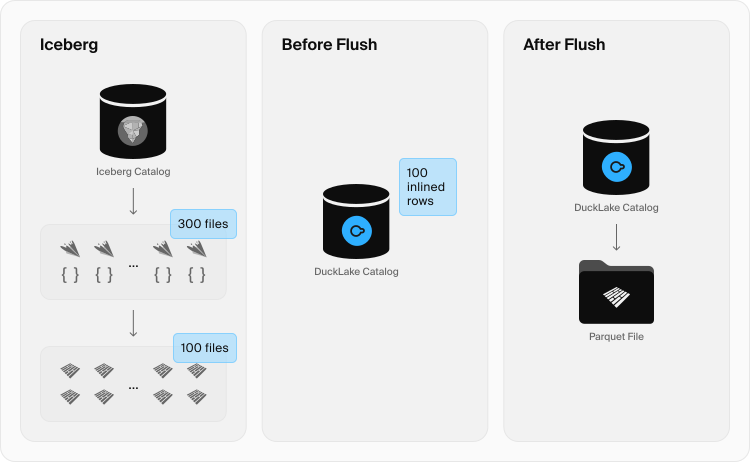
In traditional data lakes, each insertion creates its own Parquet file along with the relavant metadata files. Running the example above creates more than 300+ metadata files (200 Avro and 101 JSON files) as well as 100 Parquet files.
Click here to see the directory structure created by the pyiceberg script.
tree warehouse
warehouse
└── default
    └── readings
        ├── data
        │   ├── 00000-0-01a02dc3-deec-4be5-ab0f-5582e926419a.parquet
        │   ├── ...
        └── metadata
            ├── 00000-0a837115-bff0-4fd7-a3a0-51df4e0b5764.metadata.json
            ├── ...
            ├── 01a02dc3-deec-4be5-ab0f-5582e926419a-m0.avro
            ├── ...
            ├── snap-1086579672596758615-0-288b7b1d-f159-4692-9404-b2dba114fba2.avro
            └── ...

5 directories, 401 files
Having this many files bloats both the data and metadata layers, has a drastic impact on query performance, and on your storage (S3, GCS, …) bill. This is known as the “small files problem”. The way data lake systems have addressed this is by implementing periodic compaction jobs that merge small files into larger ones to reduce I/O costs. But these compaction routines don't solve the problem at write time, you still pay the cost of creating all those tiny files, and they don't help query performance until they actually run.
DuckLake takes a fundamentally different approach. Because the catalog is managed by a database of the user's choice, DuckLake can store small updates, insertions, and deletions directly in the catalog instead of writing them out as files. Database systems already have decades of research into efficiently handling exactly these types of small reads and writes, making them a natural fit for this workload. Inlining is also designed to fully integrate with the time-travel nature of data lakes.
Take the same sensor workload from above and run it against DuckLake with SQLite as the catalog database.
Click here to see the Python script that loads the data into DuckLake.
import duckdb

con = duckdb.connect()
con.execute("ATTACH 'ducklake:sqlite:sensors.ducklake' AS lake (DATA_PATH 'sensor_data/')")
con.execute("""
    CREATE TABLE lake.readings (
        sensor_id INTEGER, temperature DOUBLE, ts TIMESTAMP
    )
""")

for i in range(100):
    con.execute(f"INSERT INTO lake.readings VALUES (1, 21.5, now())")

# How many Parquet files were created?
print(con.execute("SELECT count(*) FROM glob('sensor_data/*.parquet')")
    .fetchone()[0])
# 0 -- zero files, everything is inlined in the catalog
After 100 inserts, we have zero Parquet files. All data lives in the catalog, and queries work exactly as expected. The figure below depicts the difference between a traditional data lake and DuckLake for our sensor workload. In DuckLake, the data lives in the catalog, and after flushing it to the object storage, only a single Parquet file is created, containing all the data.
In the rest of this blog post, we will present a benchmark comparison of DuckLake with and without inlining for a high-contention streaming workload and cover how inlining works under the hood.
Streaming Benchmark
To understand the impact of streaming in DuckLake, we designed a benchmark that simulates an autonomous car streaming sensor data. The benchmark contains one table with 23 columns of varying types (e.g., ts as the sensor timestamp, speed_mps as a float for meters per second). The insertion rate is 100 rows per second, done in 10 batches of 10 rows. After all inserts, we run 9 aggregation queries over the table columns (e.g., avg(speed_mps), stddev(speed_mps), min(speed_mps)). Then, we perform a checkpoint, which (depending on the system) triggers compaction, flushing, and clean-up steps. All writes are performed by a single duckdb process.
We simulated 50 minutes of data, which contains 300,000 rows and 30,000 batches. The catalog database was Amazon RDS PostgreSQL 16.10, running on an EC2 c7g.2xlarge instance, and the data was stored in an S3 bucket located in the same region.
| Step | No inlining | With inlining | Improvement |
|---|---|---|---|
| Insert | 1,964 s | 375.0 s | 5.2× |
| Aggregations | 1,574 s | 1.7 s | 925.9× |
| Checkpointing | 30 s | 2.1 s | 14.5× |
Insertion is approximately 5× faster with inlining. The round-tripping cost of storing data in PostgreSQL is significantly smaller than writing a Parquet file to S3 for each batch.
The most striking result is aggregation performance: a 926× difference. Without inlining, every query must open all 30,000 individual Parquet files on S3. With inlining, the data lives in PostgreSQL and the query executes directly against it, avoiding thousands of remote file reads entirely.
For checkpointing, the non-inlined case must compact 30,000 Parquet files into one, while the inlined case simply flushes data from the PostgreSQL catalog to a single Parquet file on S3, resulting in a 14.5× improvement.
We Need to Talk about Iceberg
We also ran the benchmark against Iceberg using pyiceberg and Apache Polaris, which is a common setup to manage Iceberg tables in production. The 50-minute streaming workload took prohibitively long for Iceberg, so we scaled it down to just 100 seconds (10,000 rows, 1,000 batches in total).
| Step | Iceberg (Polaris) | DuckLake with inlining | Improvement |
|---|---|---|---|
| Insert | 1,148.77 s | 10.88 s | 105× |
| Aggregation | 83.06 s | 0.09 s | 923× |
| Checkpointing | 52.83 s | 0.28 s | 189× |
DuckLake with inlining is two orders of magnitude faster across the board, and nearly three orders of magnitude faster for aggregations. The gap comes down to architecture: Iceberg has an extra REST hop (Polaris) between client and PostgreSQL, and its snapshot model (manifest + manifest-list + metadata JSON) writes around four S3 files per batch vs. zero for DuckLake with inlining. This explains the drastic performance difference.
We did our best to create a realistic setup for all systems. It is possible to alleviate the small files problem with architectural and design changes, such as buffering writes on the client's side or inserting larger batches, but that sacrifices ACID guarantees and limits multi-user support, which defeats much of the point of streaming into a data lake.
DuckLake is easy to set up, so you are welcome to give it a spin and run your own workloads to see the difference yourself.
How Inlining Works
If you're curious about what happens under the hood, this section walks through the internals.
When you insert, delete, or update fewer rows than the inlining threshold (by default, 10), DuckLake stores the change in the catalog database instead of writing a Parquet file. The threshold can be changed at the global, schema, or table level:
-- Global: change the default for all tables
SET ducklake_default_data_inlining_row_limit = 50;

-- Per-table: override for a specific table
ALTER TABLE lake.readings SET (data_inlining_row_limit = 100);

-- Disable inlining entirely
SET ducklake_default_data_inlining_row_limit = 0;
In practice, this means you can stream data into DuckLake without worrying about the proliferation of small files. DuckLake manages the inlined data through insertion and deletion tables in the catalog, tracked by internal tables in the specification. During query time, DuckLake seamlessly combines inlined data with any existing Parquet files, so queries always return the right result regardless of where the data lives. Below we walk through how each operation works.
Insertion
When the size of an insert fits below the inlining threshold, DuckLake does not create a Parquet file. Instead, it stores the rows directly in an inlined data table inside the catalog database. This table contains the original columns plus three metadata columns:
row_id– the identifier of that rowbegin_snapshot– the snapshot where the row was insertedend_snapshot– the snapshot where the row was deleted orNULLif it still exists
The snapshot columns let DuckLake maintain full time travel support even for inlined data.
Let's walk through a concrete example. First, we set up a DuckLake catalog and create a table:
ATTACH 'ducklake:sensors.ducklake' AS lake (DATA_PATH 'sensor_data/');

CREATE TABLE lake.readings (
    sensor_id INTEGER,
    temperature DOUBLE,
    ts TIMESTAMP
);
Now we insert a few small batches, each below the default threshold of 10 rows:
INSERT INTO lake.readings VALUES (1, 21.5, '2025-03-27 10:00:00');
INSERT INTO lake.readings VALUES (2, 22.1, '2025-03-27 10:00:10');
INSERT INTO lake.readings VALUES (1, 21.8, '2025-03-27 10:00:20');
None of these inserts created a Parquet file. Instead, all three rows live in the catalog database in an inlined data table named ducklake_inlined_data_table-id_schema-version. If we peek inside the catalog:
ATTACH 'sensors.ducklake' AS catalog_db;
SELECT * FROM catalog_db.ducklake_inlined_data_1_1;
┌────────┬────────────────┬──────────────┬───────────┬─────────────┬─────────────────────┐
│ row_id │ begin_snapshot │ end_snapshot │ sensor_id │ temperature │         ts          │
│ int64  │     int64      │    int64     │   int32   │   double    │      timestamp      │
├────────┼────────────────┼──────────────┼───────────┼─────────────┼─────────────────────┤
│      0 │              2 │         NULL │         1 │        21.5 │ 2025-03-27 10:00:00 │
│      1 │              3 │         NULL │         2 │        22.1 │ 2025-03-27 10:00:10 │
│      2 │              4 │         NULL │         1 │        21.8 │ 2025-03-27 10:00:20 │
└────────┴────────────────┴──────────────┴───────────┴─────────────┴─────────────────────┘
Each insert created a new snapshot, but no new files. The end_snapshot is NULL for all rows because none have been deleted yet. Note that begin_snapshot starts at 2 because the CREATE TABLE statement itself takes snapshot 1.
If a delete targets a row that is still inlined, DuckLake handles it in place by setting the end_snapshot column on that row. No deletion file is created. For example:
DELETE FROM lake.readings WHERE sensor_id = 2;
┌────────┬────────────────┬──────────────┬───────────┬─────────────┬─────────────────────┐
│ row_id │ begin_snapshot │ end_snapshot │ sensor_id │ temperature │         ts          │
│ int64  │     int64      │    int64     │   int32   │   double    │      timestamp      │
├────────┼────────────────┼──────────────┼───────────┼─────────────┼─────────────────────┤
│      0 │              2 │         NULL │         1 │        21.5 │ 2025-03-27 10:00:00 │
│      1 │              3 │            5 │         2 │        22.1 │ 2025-03-27 10:00:10 │
│      2 │              4 │         NULL │         1 │        21.8 │ 2025-03-27 10:00:20 │
└────────┴────────────────┴──────────────┴───────────┴─────────────┴─────────────────────┘
Sensor 2's row now has end_snapshot = 5, meaning it was deleted in snapshot 5. A regular query will filter it out, but time travel queries can still see it.
Deletion
Deletion inlining covers a different case: deleting rows that already live in Parquet files. Instead of rewriting the Parquet files or creating a separate deletion file, DuckLake records the deletion in a per-table inlined deletion table inside the catalog. This table tracks which rows in which Parquet files have been deleted, along with the snapshot that caused the deletion.
For example, let's say we have a data.parquet file with some sensor readings that we want to add to our table:
CALL ducklake_add_data_files('lake', 'readings', 'data.parquet');
SELECT * FROM lake.readings;
┌───────────┬─────────────┬─────────────────────┐
│ sensor_id │ temperature │         ts          │
│   int32   │   double    │      timestamp      │
├───────────┼─────────────┼─────────────────────┤
│         1 │        20.0 │ 2025-03-27 09:00:00 │
│         2 │        19.5 │ 2025-03-27 09:00:10 │
│         3 │        21.2 │ 2025-03-27 09:00:20 │
│         4 │        18.8 │ 2025-03-27 09:00:30 │
└───────────┴─────────────┴─────────────────────┘
Now if we delete one row from this file, DuckLake does not rewrite the Parquet file. Instead, it creates an inlined deletion table in the catalog named ducklake_inlined_delete_table-id:
DELETE FROM lake.readings WHERE sensor_id = 3;

SELECT * FROM catalog_db.ducklake_inlined_delete_1;
┌─────────┬────────┬────────────────┐
│ file_id │ row_id │ begin_snapshot │
│  int64  │ int64  │     int64      │
├─────────┼────────┼────────────────┤
│       0 │      2 │              6 │
└─────────┴────────┴────────────────┘
The entry tells DuckLake that row 2 in file 0 was deleted in snapshot 6. At query time, DuckLake filters out this row from the Parquet file scan, so it never shows up in the result.
Updates
Updates are simply a deletion followed by an insertion, so they follow the exact same steps described above and are fully supported.
Flushing
Inlined data can of course grow over time, so DuckLake also provides a flushing operation that materializes inlined rows into consolidated Parquet files. This is useful when performance requires it or for migration purposes.
-- Flush all inlined data in the catalog
CALL ducklake_flush_inlined_data('lake');

-- Flush a specific table only
CALL ducklake_flush_inlined_data('lake', table_name => 'readings');
Alternatively, flushing is also part of the checkpoint routine, which runs all maintenance operations (flush, snapshot expiration, file merging, and cleanup) in sequence:
CHECKPOINT lake;
Conclusion
The “small files problem” has been one of the main pain points of data lakes for streaming workloads. For such workloads, traditional data lake formats end up with small files during write time and clean it up afterwards in a maintenance job. DuckLake avoids it entirely by storing small changes directly in the catalog, where database systems have been optimizing exactly this kind of workload for decades.
| Traditional data lakes | DuckLake with inlining | |
|---|---|---|
| Small insert | Creates a Parquet file | Stored in the catalog |
| Small delete | Creates a deletion file | Stored in the catalog |
| Files after 1,000 inserts | 1,000+ files | 0 files |
| Compaction needed | Yes, periodically | No, flush when ready |
| Query performance | Degrades with file count | Not affected by small writes |
| Configuration | Tuning required | Works out of the box |
Inlining works out of the box with zero configuration. Inserts, deletes, and updates are all supported. When the data is ready to be stored as Parquet files, a single checkpoint takes care of it.
Data inlining will ship with DuckLake 1.0 in April alongside DuckDB v1.5.2, but you don't have to wait. Install DuckLake from the core_nightly repository of DuckDB v1.5.1.
FORCE INSTALL ducklake FROM core_nightly;
LOAD ducklake;
You can then point it at a streaming workload and see the difference for yourself. Run your own benchmarks and get a feel for it. It takes five minutes to set up and zero configuration to run.
If you encounter any issues, open them on GitHub. If you run into special cases and want to discuss them, we have an active community on the DuckDB Discord channel.