
While access control is not per se a feature of DuckLake, we can leverage the tools that DuckLake uses and their permission systems to implement schema- and table-level permissions for data files in DuckLake.
Warning This approach requires trusted writers. Readers can access metadata and any inlined data for all tables. Writers can change catalog configuration. The example disables data inlining so that storage policies apply to the table data.
Basic Principles
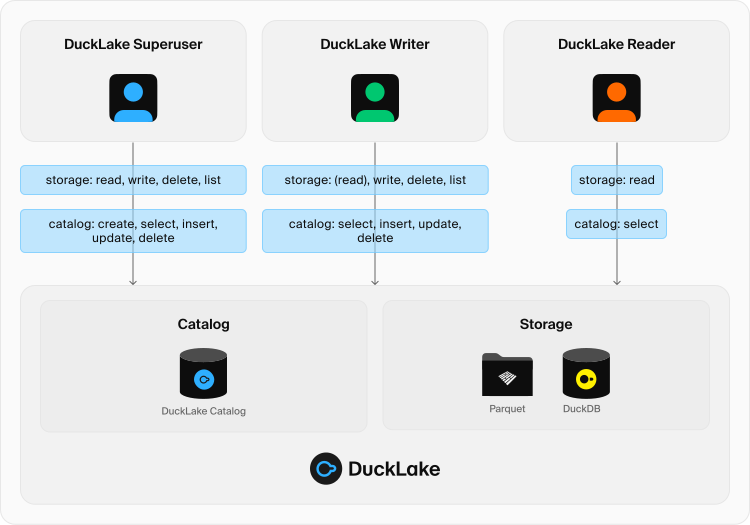
In this guide, we focus on three different roles regarding access control in DuckLake:
- The DuckLake Superuser can perform any DuckLake operation, most notably:
- Initializing DuckLake (done the first time we run the
ATTACHcommand). - Creating schemas.
CREATE,INSERT,UPDATE,DELETE, andSELECTon any DuckLake table.
- Initializing DuckLake (done the first time we run the
- The DuckLake Writer can perform the following operations:
ATTACHto an existing DuckLake.CREATE,INSERT,UPDATE,DELETE, andSELECTon any or a subset of DuckLake tables.- Optionally,
SELECTon any or a subset of DuckLake tables. CREATEschema.
- The DuckLake Reader can perform the following operations:
ATTACHto an existing DuckLake. BothREAD_ONLYand regular attaching modes will work.SELECTon any or a subset of DuckLake tables.
These roles are not actually implemented in DuckLake; they are constructs used in this guide, as they represent the most common types of roles present in data management systems.
DuckLake has two components: the metadata catalog, which resides in a SQL database, and the storage, which can be any filesystem backend. The roles mentioned above require different specific permissions at the catalog level:
- The DuckLake Superuser needs all permissions under the specified schema (
publicby default). Since this user initializes all tables, they also become the owner. Subsequent migrations between different version of the DuckLake specification must be carried out by this user. - With data inlining disabled, the DuckLake Writer needs
USAGEon the metadata schema and permissions toINSERT,UPDATE,DELETE, andSELECTon the metadata tables. Operations that create, alter, or drop metadata tables require additional permissions. - The DuckLake Reader needs
USAGEon the metadata schema andSELECTpermissions on the metadata tables.
At the storage level, we can leverage the way DuckLake structures data paths for different tables, which uses the following convention:
/schema/table/partition/data_file.parquet
This convention applies to simple names in top-level schemas. Nested schemas use UUID directories under the data root, so a parent schema's path policy does not cover its nested schemas.
Using this convention and the policy mechanisms of certain filesystems (such as cloud-based object storage), we can establish access to certain paths at the schema, table, or even partition level.
This will not work if we use
ducklake_add_data_filesand the added files do not follow the path convention; permissions at the path level will not apply to these files.
The following diagram shows how these roles and their necessary permissions work in DuckLake:
Access Control with S3 and PostgreSQL
The following is an example implementation of the basic principles described above, focusing on PostgreSQL as a DuckLake catalog and S3 as the storage backend.
PostgreSQL Requirements
The following example shows the PostgreSQL permissions corresponding to these three roles. Run it as an administrator connected to the existing access_control database before initializing DuckLake:
-- Setup initialization user, migrations, and writing, assuming the database is already created
CREATE USER ducklake_superuser WITH PASSWORD 'simple';
GRANT CREATE ON DATABASE access_control TO ducklake_superuser;
GRANT CREATE, USAGE ON SCHEMA public TO ducklake_superuser;
GRANT SELECT, INSERT, UPDATE, DELETE ON ALL TABLES IN SCHEMA public TO ducklake_superuser;

-- Writer/reader
CREATE USER ducklake_writer WITH PASSWORD 'simple';
GRANT USAGE ON SCHEMA public TO ducklake_writer;
GRANT SELECT, INSERT, UPDATE, DELETE ON ALL TABLES IN SCHEMA public TO ducklake_writer;

-- Reader only
CREATE USER ducklake_reader WITH PASSWORD 'simple';
GRANT USAGE ON SCHEMA public TO ducklake_reader;
GRANT SELECT ON ALL TABLES IN SCHEMA public TO ducklake_reader;

ALTER DEFAULT PRIVILEGES FOR ROLE ducklake_superuser IN SCHEMA public
    GRANT SELECT, INSERT, UPDATE, DELETE ON TABLES TO ducklake_writer;
ALTER DEFAULT PRIVILEGES FOR ROLE ducklake_superuser IN SCHEMA public
    GRANT SELECT ON TABLES TO ducklake_reader;
Note: for simplicity, the example above uses CREATE USER statements.
If multiple users need to fulfill the same role, then you can create them as PostgreSQL roles (a.k.a. user groups) instead using the CREATE ROLE-statement, and GRANT the role to all users that require it.
S3 Requirements
In AWS, we create three users. The writer user will only have access to a specific schema, and the reader will only have access to a specific table. The policies needed for these users are as follows:
DuckLake Superuser
{
  "Version": "2012-10-17",
  "Statement": [
    {
      "Sid": "DuckLakeSuperuser",
      "Effect": "Allow",
      "Action": [
        "s3:ListBucket",
        "s3:GetObject",
        "s3:PutObject",
        "s3:DeleteObject"
      ],
      "Resource": [
        "arn:aws:s3:::ducklake-access-control",
        "arn:aws:s3:::ducklake-access-control/*"
      ]
    }
  ]
}
DuckLake Writer/Reader
{
  "Version": "2012-10-17",
  "Statement": [
    {
      "Sid": "DuckLakeWriter",
      "Effect": "Allow",
      "Action": [
        "s3:ListBucket",
        "s3:GetObject",
        "s3:PutObject",
        "s3:DeleteObject"
      ],
      "Resource": [
        "arn:aws:s3:::ducklake-access-control",
        "arn:aws:s3:::ducklake-access-control/some_schema/*"
      ]
    }
  ]
}
Note that we allow s3:DeleteObject, which enables the writer to perform compaction and cleanup jobs that require rewriting data files.
DuckLake Reader
{
  "Version": "2012-10-17",
  "Statement": [
    {
      "Sid": "DuckLakeReader",
      "Effect": "Allow",
      "Action": [
        "s3:GetObject"
      ],
      "Resource": [
        "arn:aws:s3:::ducklake-access-control",
        "arn:aws:s3:::ducklake-access-control/some_schema/some_table/*"
      ]
    }
  ]
}
DuckLake Test
In this section, we connect to DuckLake using these different roles to demonstrate how the implementation works in practice using the DuckLake extension of DuckDB.
Let's initialize DuckLake and perform some basic operations with the DuckLake Superuser.
-- Using the credentials for the AWS DuckLake Superuser (other providers such as STS or SSO can also be used)
CREATE OR REPLACE SECRET s3_ducklake_superuser (
  TYPE s3,
  PROVIDER config,
  KEY_ID 'key',
  SECRET 'secret',
  REGION 'eu-north-1'
);

-- Using the DuckLake Superuser credentials for Postgres
CREATE OR REPLACE SECRET postgres_secret_superuser (
  TYPE postgres,
  HOST 'localhost',
  DATABASE 'access_control',
  USER 'ducklake_superuser',
  PASSWORD 'simple'
);

-- DuckLake config secret
CREATE OR REPLACE SECRET ducklake_superuser_secret (
  TYPE ducklake,
  METADATA_PATH '',
  DATA_PATH 's3://ducklake-access-control/',
  METADATA_PARAMETERS MAP {'TYPE': 'postgres','SECRET': 'postgres_secret_superuser'}
);

-- This initializes DuckLake
ATTACH 'ducklake:ducklake_superuser_secret' AS ducklake_superuser;
USE ducklake_superuser;
CALL ducklake_superuser.set_option('data_inlining_row_limit', 0);

-- Perform operations in DuckLake
CREATE SCHEMA IF NOT EXISTS some_schema;
CREATE TABLE IF NOT EXISTS some_schema.some_table (id INTEGER, name VARCHAR);
INSERT INTO some_schema.some_table VALUES (1, 'test');
Now let's use the DuckLake Writer:
-- Drop this to avoid the extension defaulting to this secret
DROP SECRET s3_ducklake_superuser;

-- Using the DuckLake Writer credentials for Postgres
CREATE OR REPLACE SECRET postgres_secret_writer (
  TYPE postgres,
  HOST 'localhost',
  DATABASE 'access_control',
  USER 'ducklake_writer',
  PASSWORD 'simple'
);

-- Using the credentials for the AWS DuckLake Writer
CREATE OR REPLACE SECRET s3_ducklake_schema_reader_writer (
  TYPE s3,
  PROVIDER config,
  KEY_ID 'key',
  SECRET 'secret',
  REGION 'eu-north-1'
);

-- DuckLake config secret
CREATE OR REPLACE SECRET ducklake_writer_secret (
  TYPE ducklake,
  METADATA_PATH '',
  DATA_PATH 's3://ducklake-access-control/',
  METADATA_PARAMETERS MAP {'TYPE': 'postgres','SECRET': 'postgres_secret_writer'}
);

ATTACH 'ducklake:ducklake_writer_secret' AS ducklake_writer;
USE ducklake_writer;

-- Perform operations
CREATE TABLE IF NOT EXISTS some_schema.another_table (id INTEGER, name VARCHAR);
INSERT INTO some_schema.another_table VALUES (1, 'test'); -- Works
INSERT INTO some_schema.some_table VALUES (2, 'test2'); -- Also works

-- Try to perform an unauthorized operation
CREATE TABLE other_table_in_main (id INTEGER, name VARCHAR); -- This unfortunately works
INSERT INTO other_table_in_main VALUES (1, 'test'); -- This doesn't work
In the last example, there are limitations to this approach. We can create an empty table, as this only inserts a new record in the metadata catalog—something the DuckLake Writer is allowed to do. The solution is to wrap table initializations in a transaction to ensure the table can't be created if there is no permission to insert data.
BEGIN TRANSACTION;
CREATE TABLE another_table_in_main (id INTEGER, name VARCHAR);
INSERT INTO another_table_in_main VALUES (1, 'test');
COMMIT;
This will throw the following error:
HTTP Error:
Unable to connect to URL "https://ducklake-access-control.s3.amazonaws.com/main/another_table_in_main/ducklake-01992ec2-d9f7-745e-88e8-708e659a70be.parquet": 403 (Forbidden).

Authentication Failure - this is usually caused by invalid or missing credentials.
* No credentials are provided.
* See https://duckdb.org/docs/stable/extensions/httpfs/s3api.html
The error message is the generic one used when DuckDB cannot access an object in S3; nothing specific to DuckLake.
The failed insertion aborts the transaction, so COMMIT rolls it back and the table is not created.
If you stop after the error instead, run ROLLBACK;.
The DuckLake Reader is the simplest role.
DROP SECRET s3_ducklake_schema_reader_writer;
CREATE OR REPLACE SECRET s3_ducklake_table_reader (
  TYPE s3,
  PROVIDER config,
  KEY_ID 'key_id',
  SECRET 'secret_key',
  REGION 'eu-north-1'
);
CREATE OR REPLACE SECRET postgres_secret_reader (
  TYPE postgres,
  HOST 'localhost',
  DATABASE 'access_control',
  USER 'ducklake_reader',
  PASSWORD 'simple'
);
CREATE OR REPLACE SECRET ducklake_reader_secret (
  TYPE ducklake,
  METADATA_PATH '',
  DATA_PATH 's3://ducklake-access-control/',
  METADATA_PARAMETERS MAP {'TYPE': 'postgres','SECRET': 'postgres_secret_reader'}
);
ATTACH 'ducklake:ducklake_reader_secret' AS ducklake_reader;
USE ducklake_reader;

SELECT * FROM some_schema.some_table; -- Works
SELECT * FROM some_schema.another_table; -- Fails
The last query will print the following error:
HTTP Error:
HTTP GET error on 'https://ducklake-access-control.s3.amazonaws.com/some_schema/another_table/ducklake-019929c8-c9c9-77d7-91e6-bc3c6dc87605.parquet' (HTTP 403)
If we try to create a table, which is just a metadata operation, the error will be different, as it is imposed by a lack of permissions on the PostgreSQL side:
CREATE TABLE yet_another_table (a INT);
The error includes the following message (the metadata query is abbreviated):
TransactionContext Error:
Failed to commit: Failed to commit DuckLake transaction.
Failed to flush changes into DuckLake: Failed to execute query "...": ERROR:  permission denied for table ducklake_snapshot